Weekly Update History: How NetSuite Changelog Tracks Every Documentation Change
Discover how NetSuite Changelog's Weekly Update History feature tracks every change Oracle makes to NetSuite documentation, giving administrators and developers a clear timeline to compare updates across releases.
If you've ever opened the Oracle NetSuite Help Center and wondered "what actually changed since the last time I checked?" — you're not alone. Oracle updates its NetSuite documentation on a weekly basis, but there's no built-in changelog, no diff view, and no notification system telling you what was added, removed, or modified.
That's exactly the problem Weekly Update History solves on NetSuite Changelog.
The Problem: NetSuite Documentation Changes Are Invisible
Oracle NetSuite ships platform updates continuously. Between major releases like 2025.1 and 2025.2, the Help Center receives dozens of weekly updates — new features get documented, existing pages get revised, and sometimes entire sections are restructured. For the 1,500+ articles tracked on NetSuite Changelog, these weekly changes happen quietly and without announcement.
This creates real challenges for NetSuite professionals:
Administrators miss configuration changes that affect live environments
Developers don't catch API or SuiteScript updates until something breaks
Consultants discover outdated advice when they're already mid-implementation
Implementation partners can't proactively advise clients on new capabilities
Oracle publishes Weekly Help Center Updates as summary pages, but these are high-level lists that don't show you exactly what changed within each article. You'd have to manually compare pages to spot the differences.
How Weekly Update History Works
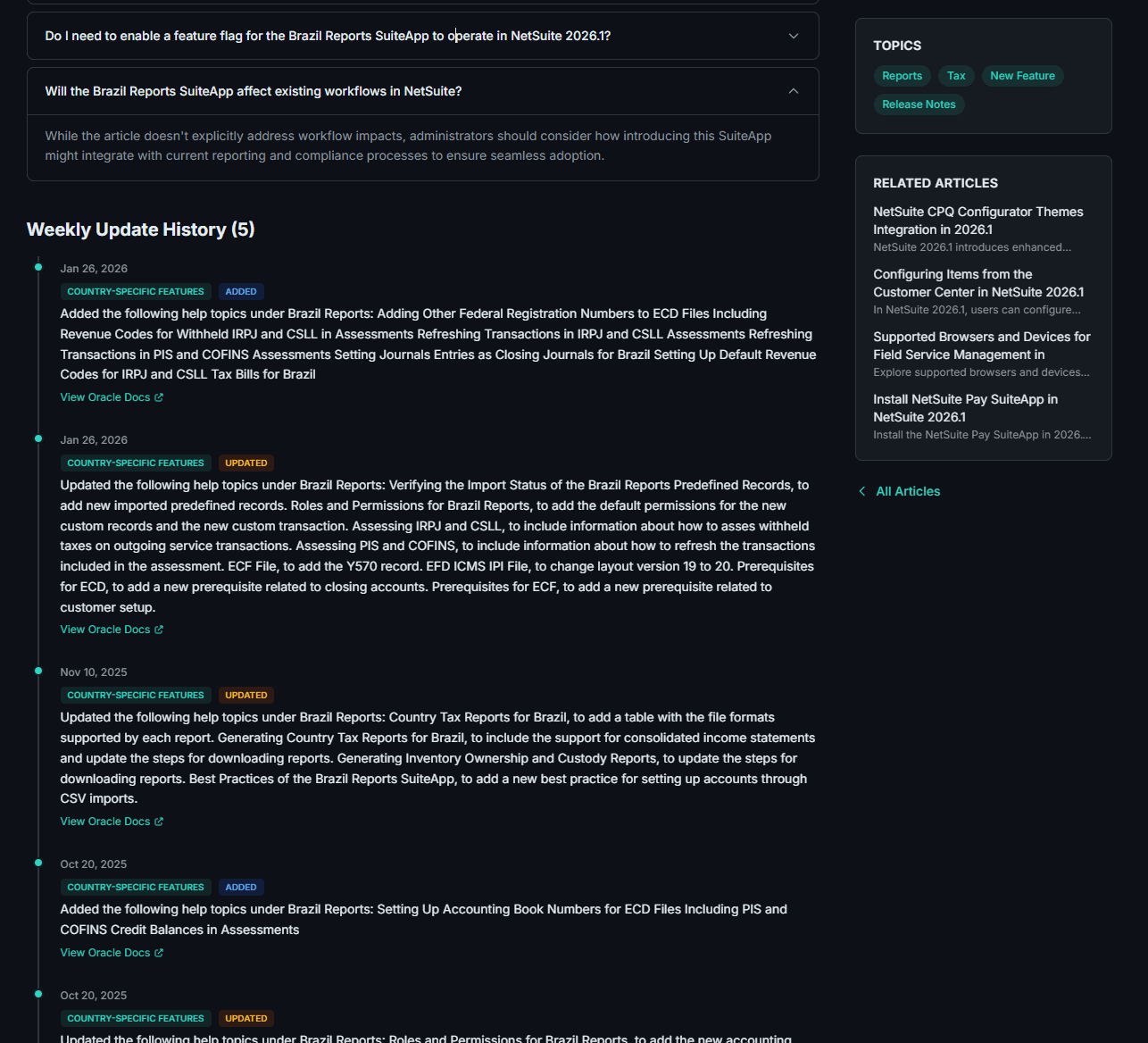
Every article on NetSuite Changelog now includes a Weekly Update History section at the bottom of the page.
The Weekly Update History timeline as it appears on every article page — a chronological record of every Oracle documentation change.
Each entry in the timeline includes:
Date — When the change was detected, tied to Oracle's weekly update cycle
Category — The area of NetSuite affected (e.g., SuiteScript, Accounting, Commerce, Inventory)
Change Type — Whether the content was added (new documentation) or updated (existing content modified)
Description — A plain-language summary of what changed
Oracle Docs Link — A direct link to the official Oracle documentation so you can verify the source
Think of it as git log for NetSuite documentation — a chronological record of every change, organized by article.
Why This Matters for Your NetSuite Practice
Stay Ahead of Breaking Changes
When Oracle modifies SuiteScript behavior or deprecates an API endpoint, the documentation update often appears weeks before the change takes effect. The Weekly Update History lets you spot these changes early so you can update your customizations proactively rather than reactively.
Compare Across Releases
Each update is tied to a specific NetSuite release (2025.1, 2025.2, 2026.1, etc.). This means you can see how a feature has evolved across releases — what was added in 2025.1, what was modified in 2025.2, and what's new in 2026.1. This release-level visibility is something you can't get from the Oracle Help Center alone.
Verify Before You Implement
Before building a customization or advising a client, you can check the update history to confirm the documentation you're referencing is current. If the article was updated last week, you'll see exactly what changed — no guessing required.
Audit Trail for Compliance
For organizations that need to document why certain configurations were changed, the Weekly Update History provides an external audit trail. You can reference specific Oracle documentation updates with dates and direct links to justify system changes.
A Real-World Example
Let's say you're researching SuiteScript 2.1 Map/Reduce Scripts for a data migration project. You navigate to the article on NetSuite Changelog and scroll down to the Weekly Update History. You might see:
Jan 15, 2026 — Updated — "Added new governance limit documentation for Map/Reduce scripts in 2026.1"
Dec 4, 2025 — Updated — "Clarified concurrency limits for scheduled Map/Reduce executions"
Sep 20, 2025 — Added — "New section on error handling best practices for the reduce stage"
In 30 seconds, you know exactly what's changed in the last few months — and you can click through to Oracle's official docs to read the details. No manual page comparison, no guessing what's different.
How We Track These Changes
NetSuite Changelog monitors Oracle's official documentation sources automatically:
Weekly crawls — Our system checks Oracle's Help Center for updates on a weekly cadence, aligned with Oracle's own update schedule
Change detection — When content changes are detected, they're categorized by type (added, updated) and mapped to the relevant article
Release association — Each update is linked to the active NetSuite release, making cross-release comparison possible
Community-friendly rewrite — The raw changes are summarized into clear, actionable descriptions rather than raw diffs
Every article links back to the original Oracle source, so you always have a direct path to the official documentation.
Where to Find Weekly Update History
The Weekly Update History section appears on every article page that has tracked changes. To find it:
Open any article
Scroll past the article content and FAQs
The Weekly Update History timeline appears at the bottom, showing all documented changes
You can also browse updates by release on the release pages, where all weekly updates for a specific NetSuite version are grouped together chronologically.
What's Coming Next
We're continuously improving how NetSuite Changelog tracks and presents Oracle documentation changes. Here's what's on the roadmap:
Email notifications — Subscribe to specific articles or categories and get notified when Oracle updates the documentation
Richer change descriptions — More detailed summaries of what specifically changed in each update
Search within updates — Filter and search across all weekly updates to find changes relevant to your work
Start Tracking NetSuite Changes Today
The Weekly Update History is available right now on every article at NetSuite Changelog. No signup required — just browse any article and scroll to the timeline.
If you're a NetSuite administrator, developer, or consultant, this is the fastest way to stay informed about what Oracle is changing in the platform documentation — without having to manually check the Help Center every week.
Advertising
Reach Product Updates Professionals
Put your product in front of NetSuite experts who work with Product Updates every day.
Sponsor This Category